Creating Top-Level Financial Structure With SAP FICO
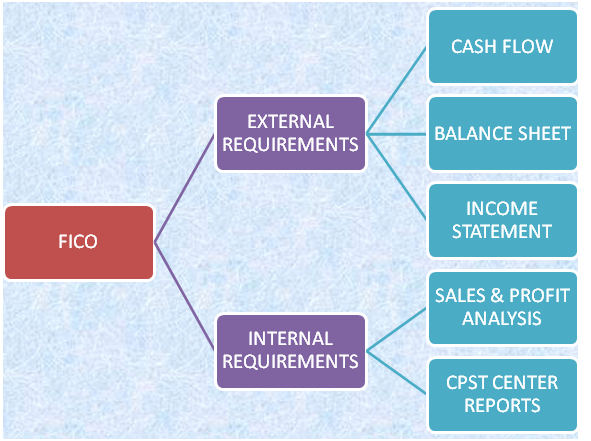
When it comes to creating top level financial structure in any enterprise, one of the best solutions would be resorting to SAP FICO. In fact, the application itself is the top level financial structure that contains the GL accounts. Such accounts refer to all the accounts as well as one chart of accounts that is assigned to company codes of different types.
What SAP FICO Contains
Basically,SAP FICOcontains the list of GL accounts with all their details. The contents include the account number and the name, in addition to the language and length of the account. Apart from these the application also contains information about the cost elements, blocking information that regulates the functioning of the account. It also indicates how the GL account is created in the company code.
Account Group in SAP FICO
Account group in the application determines the fields that are essential for configuring the GL master record. Minimum requirements for the purpose are two. Out of these two, one would be used for B/S whereas the other one would be used for P&L accounts. Basic task accomplished by the tool is controlling the number ranges in GL besides the status field in the master record of the GL is a part of the company code area.
Role Played by Posting Key
In SAP FICO training,the necessity of controlling the line items is taken care of by the posting key. The role played by the posting key is that of controlling all types of GL entries that include all the units in the debit, as well as the credit side of the account.
Understanding the Business Area
In proper use of the application, it is necessary that the user understands the features of the business area on which the FICO is going to be applied. The business area is the organizational unit relating to external accounting. It corresponds to specific business segment or the areas of responsibilities in any enterprise. It is also possible creating financial statements for such business areas catering to the internal objectives of the enterprise. These statements are thereafter used for reporting that goes across the company codes. In the process, it will cover main operations of any enterprise. Such operations could be product lines or branches of the company concerned. Moreover, the business areaof any enterprise can also be one that deals with the product area of the application.
Manual and Automatic Creation of Cost Element
When the chart of account is defined the user would come across two different fields in creating the cost elements. One of them is the manual creation of cost element whereas the other one is the automatic creation of the cost element. When the expenses are created manually they are the manual creation of cost elements and when they are created automatically they are the automatic cost elements in the course of defining the chart of accounts.
Customer/Vendor Configuration
An important aspect of creating the customer as well as vendor configuration is checking the concerned account group where they are included. It can ultimately be checked using the vendor as well as the customer group and the process is implemented on the SAP FICOplatform. It is also an aspect to learn about configuration of the fiscal year in the system. For instance; if the account chart is going to have the first month in April each year then while configuring the month is allotted symbolic number 1 for the month. It would be followed with 2 for May, 3 for June and so on.
Fiscal Areas of SAP FICO
It is necessary in understanding the fiscal areas of the application. For instance; FSGV is the element that controls additional account assignments as well as other fields. The control is distributed in three levels such as the OBC4 that controls the screen for any particular GL; posting keys, and accounting groups.
Posting period variants are independent of accounting groups but it also has an important role in the entire process.
Stay Connected to Indian America
Get the latest community stories, local events, entertainment and lifestyle updates delivered to your inbox.


