Which Are The Best JavaScript Libraries To Animate SVG?
Scalable Vector Graphic, or SVG, is resolution independent. This means it can seamlessly scale to any screen size without comprising with the quality, on retina displays as well. It is a one-of-a-kind graphics format that stores information of the image or graphic in XML. SVG is very easy to use, and a wide range of JavaScript libraries are also available to create stunning graphics and animations for responsive website design.
Discussed here are the best JavaScript libraries that can be manipulated to create SVG animation and graphics.
Bonsai
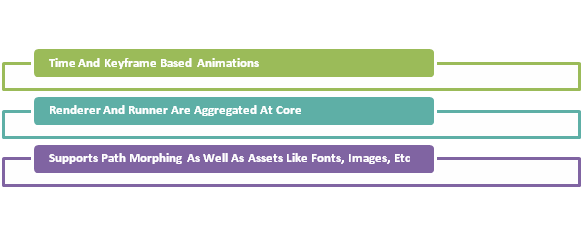
It is a powerful library that allows designers to draw, edit and animate graphical aspects on web pages. The best thing about Bonsai is that it supports both SVG and HTML5 graphic-type Canvas. With this next-generation library, you can easily build something from a simple circle or rectangle to a more complex, multi-layer game. It is a comprehensive toolset for graphics animation and manipulation. It comes as SVG rendered, which means one can create SVG animations with Bonsai, as well as use graphics API to animate and manipulate. Some of the most important features of this library are:
Velocity.js
This library is perfect to create “accelerated JavaScriptanimation,” and can bring life to any type of graphics. It is designed for speed, and is capable to deliver high-quality animations real fast. Furthermore, it is very easy to get started with this library if you have experience in jQuery animations. It uses similar API as is used to animate in jQuery. One of the best things about Velocity is that it provides full support for SVG element animation, including SVG specific properties such as rx, x, stroke-width, etc. It also supports color animation for stroke, fill, and stopColor properties available in SVG.
Vivus
If you want to give your SVG animation the appearance of being drawn, Vivus is the right choice. It works out of the box, and does not require any dependency. You have to just include .js file in your HTML, allot the SVG element that you wish to animate, and add some preset options to get started with your animation right away. Here is an example –
new Vivus( ‘svg-element’, {type: ‘oneByOne’, duration: 200})
In this example, Vivus will animate the SVG element in 200 milliseconds. Every element of the SVG will be drawn one after the other within the given timeframe.
SVG.js
As it rightly says, “A lightweight library for manipulating and animating SVG,” SVG.js is truly light in weight – around 11k only and that too gzipped. Thus, you have the power to play with your scalable vector graphics with this small packet in your list. It is uncluttered and readable, and supports animations on position, size, color, and transformation. It is modular, and hence, creating extensions and plugins to improve the base functionality becomes a breeze. It supports binding various events to opacity masks, elements, text paths, clipping paths, and dynamic gradients. SVG.js is also well documented.
Raphael.js
This JavaScript library empowers you to both draw and animate scalable vector graphic on websites. It supports a gamut of web browsers, which makes it one of the most dependable libraries in this niche category. It follows W3C SVG standards, which means that the graphic element created with Raphael is a DOM object and can be manipulated using JavaScript. With this library, you can create highly interactive analytic charts, game interactions, and world maps.
SVG is here to stay. It works really well with modern web design needs. And JavaScriptlibraries are the best way to extend SVG’s performance and functionality.
Stay Connected to Indian America
Get the latest community stories, local events, entertainment and lifestyle updates delivered to your inbox.


