Advanced Features of New Tableau 2019.4
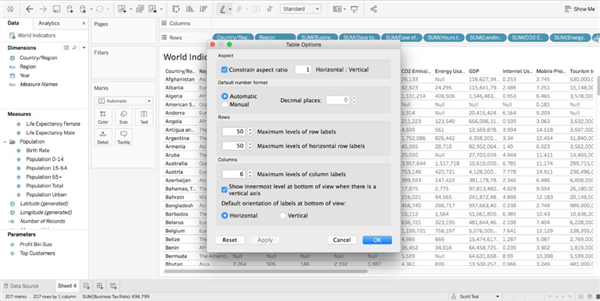
Check the advanced features of the new Tableau 2019.4
Usage of tables have entered a vast customer base, considering that and to provide a better and powerful tool, the tables’ team have come up with a set of new advanced update:
Wider tables:
Set your desired length for the tables and maximize the number of fields. Now you can add columns to the table to a maximum of 50 columns from each discrete field.
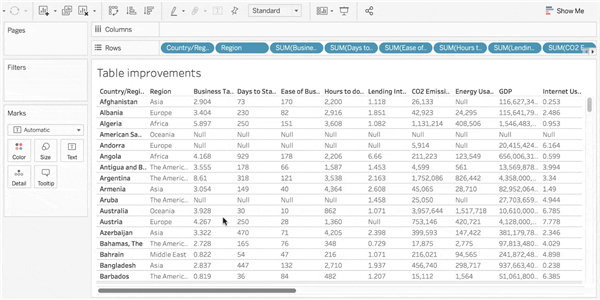
To build a list table, you will need a unique field (per row) as the leftmost column (use the below image for ref.) in your view, such as Row ID.
Apart from the increase in length, you can now horizontally move across the entire table, to check the dimensions and measures.
Sort without any limitations:
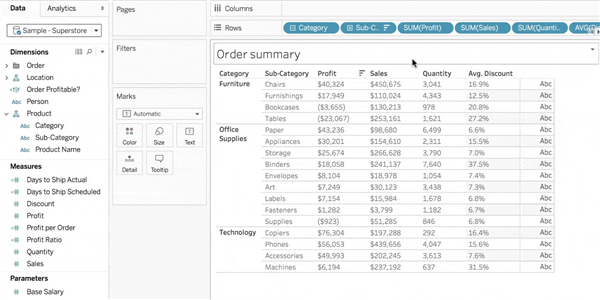
By simply clicking on to the column header, you can sort the entire table, in the below example, seeing all of the orders sorted by highest to lowest sales, or quantity, took just a couple of seconds to complete.
Three tricks to simplify your work with tables:
These tricks will enhance the user experience and provides a new perspective to the way you work with tables,
Source: https://www.tableau.com/about/blog/2019/10/tableau-table-improvements
Use a table as a supplemental viz
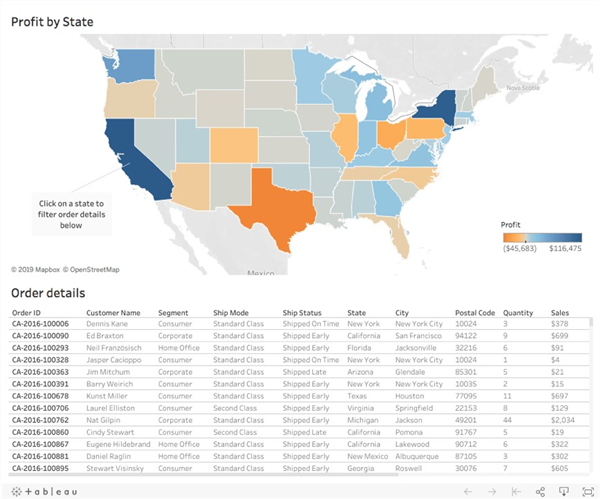
— Tables are great for getting to a granular level of detail. At the same time, all of the details can be hard to understand without some surrounding context. Consider building dashboards with a primary high-level viz, such as a map or scatterplot, and supplement it with a table below. This makes it easy for the user to drill down into a mark, and view further details as needed.
Full-width scrolling vs. Continuous fields
Have you ever wondered why a full-width scrollbar is displayed only in certain scenarios? It all depends on what fields you have in the view. Tableau interprets discrete and continuous fields differently when creating a table. For example, if you have a table with all-discrete fields on the Rows shelf, then a full-width scrollbar will be displayed. In the case of a table with both discrete and continuous fields, and depending on your screen size, only the continuous fields will scroll with the current scrolling behavior.
Be sure you’re sorting on unique fields per row
Have you clicked on a column header and the column didn’t sort as you expected it to? As we mentioned earlier, make sure your viz has a unique field (per row) in the leftmost column—such as Row ID or Order ID—which will be different for each row in your table. A field like a Customer Name may not work, because the same customer could have multiple orders, showing up as the same name in multiple rows (a non-unique field per row). In that case, you can create a combined field with unique values to add as the leftmost pill in the table, and if you’d like, hide that field from the viz.
Stay Connected to Indian America
Get the latest community stories, local events, entertainment and lifestyle updates delivered to your inbox.


